Why Your Baby's Nail Trimmer Isn't Working: 5 Common Issues & Fixes
When your baby's electric nail file stops working properly, it can turn nail care time into a frustrating challenge. Discover the most common problems parents face with electric baby nail trimmers and how to quickly resolve them.
When your baby's electric nail file stops working properly, it can turn nail care time into a frustrating challenge. Whether the grinding action feels weak, the ring light won't turn on, or strange noises emerge during operation, these issues disrupt the gentle grooming routine your little one needs.
The good news is that most problems with electric baby nail trimmers are simple to diagnose and fix. This troubleshooting guide walks you through the five most common issues parents encounter and provides actionable solutions to get your device working smoothly again.
Common Problem #1: Weak or No Grinding Action
If the grinding head spins but barely files your baby's nails, the issue often stems from worn replacement pads or incorrect speed settings. The COSLUS C50 Baby Electric Nail File Trimmer, Gentle & Safe includes 10 replacement grinding pads precisely because these wear down with regular use.
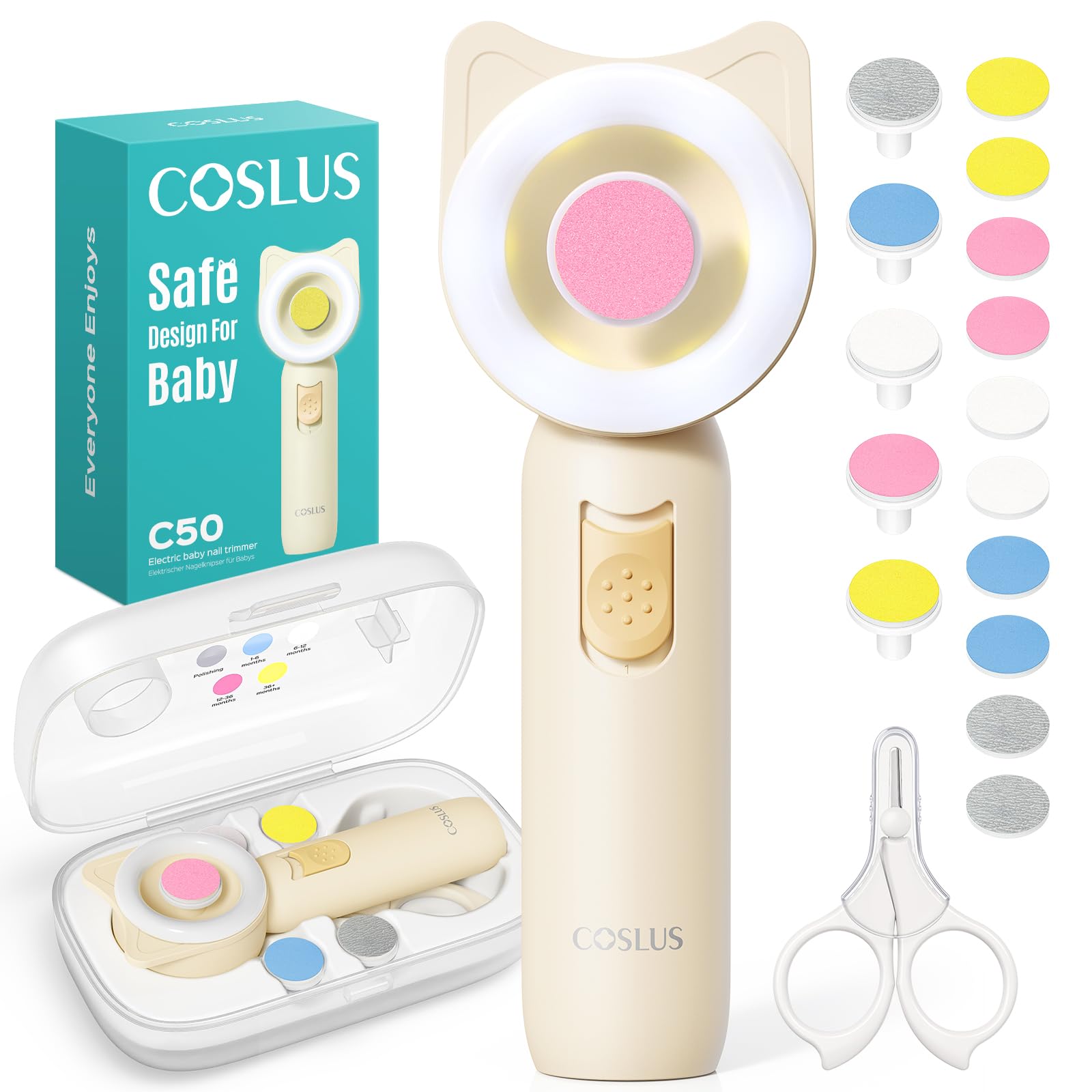
Quick fixes:
- Replace the adhesive grinding pad if it feels smooth or shows visible wear
- Switch to the higher speed setting (not the gentle 3500 RPM mode) for thicker toddler nails
- Ensure the grinding head clicks firmly into place and sits flush against the device
- Check that you're using the age-appropriate grinding head for your child's nail thickness
Common Problem #2: The Ring Light Won't Illuminate
The 360° ring light on devices like the COSLUS C50 Baby Electric Nail File Trimmer, Gentle & Safe helps you see every nail edge during nighttime grooming. When it fails, nail care becomes guesswork in dim lighting.
Troubleshooting steps:
- Replace both AAA batteries even if the motor still runs—low voltage affects the light first
- Wipe the light ring gently with a dry cloth to remove any powder residue from filing
- Verify the device powers on completely by listening for the motor sound
- Test in a darker room to confirm the light truly isn't working versus being too subtle in bright conditions
Common Problem #3: Excessive Noise During Operation
Electric nail files designed for babies should operate below 35 dB—roughly whisper-quiet. If yours suddenly sounds louder, it defeats the purpose of peaceful naptime grooming.
Noise reduction solutions:
- Remove and reattach the grinding head to ensure proper alignment
- Clean any nail dust from the motor housing opening with a soft brush
- Check for loose battery compartment covers that rattle during vibration
- Avoid pressing too hard against nails, which strains the motor and increases sound
Common Problem #4: Touch-and-Stop Feature Too Sensitive
Safety features like the touch-and-stop function on CPC-certified devices prevent accidental skin contact injuries. However, overly sensitive sensors can pause constantly during normal use.
How to adjust your technique:
- Hold your baby's finger steadier to minimize movement against the grinding surface
- Use lighter pressure and let the file do the work rather than pushing firmly
- Ensure your own hands aren't accidentally touching the grinding pad during operation
- Work on one nail at a time with deliberate, controlled motions
Common Problem #5: Device Won't Power On at All
Complete power failure is frustrating but usually has a straightforward cause. Battery-powered devices eliminate charging concerns but require proper battery installation.
Power troubleshooting checklist:
- Confirm batteries are inserted with correct polarity (+ and - markings)
- Try a fresh set of AAA batteries from a sealed package
- Inspect battery terminals for corrosion and clean with a cotton swab if needed
- Check that the power button clicks distinctly when pressed
- Remove batteries for 30 seconds, then reinstall to reset internal components
Maintenance Tips to Prevent Future Issues
Regular upkeep extends the life of your baby's nail care tools and prevents many common problems. The organized storage case that comes with comprehensive 16-in-1 sets protects components from dust and damage between uses.
Clean grinding heads after each use by gently brushing away nail dust. Replace adhesive pads when they feel smooth rather than textured. Store the device in its case to prevent moisture exposure, and remove batteries if you won't use the trimmer for extended periods.
When to Consider a Replacement
| Repair vs Replace | Decision Factor |
|---|---|
| Motor runs but grinding ineffective | Try new pads first; replace if issue persists |
| Cracked or damaged body | Replace immediately for safety |
| Light or speed settings fail | Check batteries; may indicate internal fault |
| Used through multiple children | Consider upgrade for newer safety features |
The Verdict: Troubleshooting Saves Time and Money
Most electric baby nail trimmer issues resolve quickly with basic troubleshooting. Battery replacement, grinding pad swaps, and proper cleaning solve the majority of problems without needing professional repair or replacement. Devices that include comprehensive accessory sets with multiple replacement pads and organized storage tend to last longer because parents maintain them properly.
The dual-speed adjustment, baby-safe materials, and ergonomic design of quality devices reduce the likelihood of user error causing malfunctions. When you understand how each component functions, you can identify and fix issues before they disrupt your baby's grooming routine.
Who This Troubleshooting Guide Suits
This guide works best for parents using battery-powered electric nail files with multiple grinding heads and speed settings. If you own a 16-in-1 set with safety features like touch-and-stop functions and ring lights, these solutions directly address your device's specific components.
New parents dealing with their first electric grooming tool will find the step-by-step approach reassuring. Parents of multiple children who've used their device extensively benefit from the maintenance and replacement timing advice.
Who Should Look for Alternative Solutions
If your device uses rechargeable batteries instead of AAA batteries, different power troubleshooting applies. Parents with devices that lack safety certifications should prioritize replacement over repair for their baby's protection.
When physical damage affects the grinding mechanism or body integrity, troubleshooting won't restore safe operation. Budget-friendly devices without replacement parts available may not be worth extensive repair efforts compared to investing in a more complete system.
Related Buying Guides
- Jan & Jul Cozy-Dry Baby Carrier Rain Cover Features Explained: What Makes It Weatherproof
- Stroller Fan Not Working? How to Fix Common Clip-On Fan Issues
- How to Clean, Charge, and Care for Your Baby Car Mirror with Night Light
- Baby Led Weaning Spoon FAQ: Everything Parents Ask About the ezpz Tiny Spoon
- Nursing Cover Comparison: Infinity Scarf vs. Rigid Hoop Designs for Different Moms
- Are You Wasting Freezer Space? Flat vs. Upright Breastmilk Storage Compared